BMW’s dash cam story is not just about recording footage—it’s about how much you pay, what gets captured, where it’s stored, and which models can access it.
The numbers reveal a system that’s more connected-service than standalone camera.
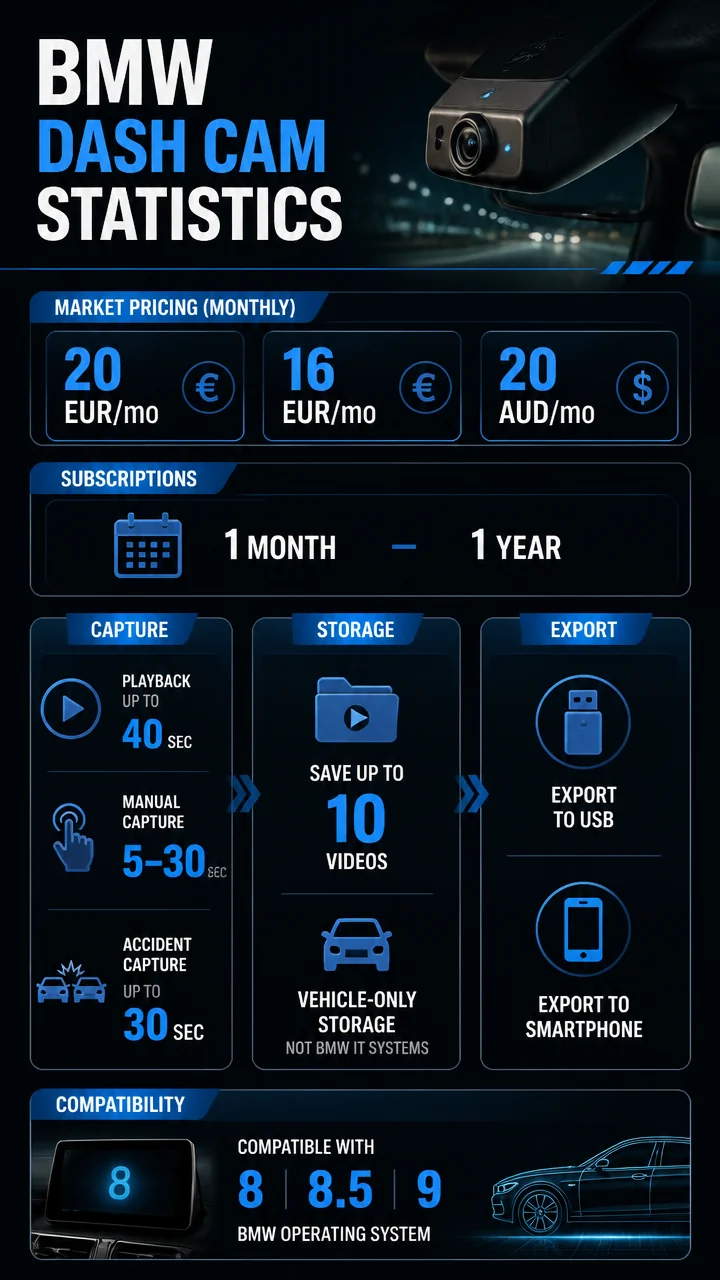
- BMW Drive Recorder pricing appears at 20 EUR per month, 16 EUR per month, and 20 AUD per month in listed ConnectedDrive stores.
- Recordings can be as short as 5 to 30 seconds around manual triggers, or up to 40 seconds in playback and certain recording modes.
- BMW stores Drive Recorder data only in the vehicle and says it is not stored in BMW IT systems.
- Availability spans BMW Operating System 8, 8.5, and 9, with export options to USB and, on some setups, a smartphone.
BMW dash cam statistics at a glance
Here’s the fast facts view of BMW Drive Recorder and Anti-Theft Recorder usage, pricing, and feature access.
- Subscription length: 1 month to 1 year
- Drive Recorder playback: up to 40 seconds
- Manual capture window: 5 to 30 seconds before and after a trigger
- Automatic accident capture: up to 30 seconds before and after an event
- Saved videos: up to 10
- Storage method: vehicle storage plus export to USB or smartphone, depending on equipment
BMW dash cam pricing statistics and subscription model
BMW’s dash cam feature is packaged as a subscription in ConnectedDrive rather than a one-time hardware add-on.
The pricing data shows a modest monthly fee structure that varies by market listing.
| Market / listing | BMW Drive Recorder price |
|---|---|
| BMW Germany ConnectedDrive store | 20 EUR per month |
| Second BMW.de ConnectedDrive store listing | 16 EUR per month |
| BMW Australia ConnectedDrive store | 20 AUD per month |
1 month to 1 year is the subscription range BMW ConnectedDrive says can be set for subscriptions, giving owners flexibility instead of locking them into a single long-term term.
That flexibility matters because Drive Recorder is not sold as a passive feature.
It is activated, configured, and managed inside the ConnectedDrive ecosystem, which makes its economics closer to a digital service than a traditional accessory.
- Pricing is reported in both EUR and AUD, showing localized subscription positioning.
- The existence of two German listings, at 20 EUR and 16 EUR, suggests BMW may present the service in more than one configuration or store context.
- Because terms can run from 1 month to 1 year, BMW appears to support short test periods as well as longer commitments.
BMW dash cam recording statistics: how long it captures video
The most useful BMW dash cam figures are the timing limits.
BMW Drive Recorder uses short capture windows designed around events, not endless recording.
Up to 40 seconds is the headline playback figure, but most useful capture windows are event-based: short, precise, and built for incidents rather than continuous use.
- Playback can reach up to 40 seconds on BMW USA’s DriverAssistance page.
- Manual recordings can capture 5 to 30 seconds before and after trigger.
- Automatic recordings can capture up to 30 seconds before and after an accident event.
- In theft cases, Drive Recorder records video only after the event.
- BMW Anti-Theft Recorder files can last up to 20 seconds or up to 40 seconds, depending on vehicle equipment.
This makes BMW’s setup notably different from continuous dash cams that keep buffering long clips all the time.
BMW instead leans into short, event-centered recordings that are easier to review and export.
Capture mode comparison
| Feature | Timing / length | What stands out |
|---|---|---|
| Drive Recorder playback | Up to 40 seconds | Short review window for incidents |
| Manual recording | 5 to 30 seconds before and after trigger | Flexible event capture |
| Automatic accident recording | Up to 30 seconds before and after | Sensor-based collision focus |
| Anti-Theft Recorder file length | Up to 20 seconds or 40 seconds | Depends on vehicle equipment |
BMW dash cam usage data: how the Drive Recorder works
BMW’s system is designed around quick activation and integrated controls.
Drivers can start recording in multiple ways, which helps the feature fit naturally into the car’s interface.
- Start Drive Recorder by long-pressing the parking button.
- Launch it from the Drive Recorder app in the vehicle’s Apps Menu.
- Activate it from the center display.
- Activate it from a mobile device.
- Triggered recordings can be launched manually or automatically.
BMW says the system uses integrated on-board cameras from the driver assistance setup and records the vehicle’s surroundings.
That means the recorder is tied to the vehicle’s existing sensor and camera architecture rather than relying on a standalone aftermarket unit.
- Automatic recordings are designed for collision events detected by vehicle sensors.
- Manual recordings give drivers more control when something happens before sensors trigger a save.
- Continuous recording to a USB stick is possible until the USB is full, giving BMW a second, more open-ended recording style.
“BMW Drive Recorder can record continuously to a USB stick until the USB is full.”
BMW dash cam storage and export statistics
One of the clearest themes in the data is that BMW tries to keep control of recording data inside the vehicle first, with export as an optional step.
- Video data are stored only in the vehicle and are available for export.
- Drive Recorder data are not stored in BMW IT systems.
- Drive Recorder and Anti-Theft Recorder data are not transferred to third parties.
- Recordings can be exported to a USB stick.
- Recordings can also be exported to a smartphone.
- Anti-Theft Recorder videos can be downloaded to a smartphone.
That privacy-first structure is notable because the feature is camera-based and event-triggered, yet BMW explicitly limits where the files live.
For drivers worried about data handling, these storage rules are some of the most important statistics in the entire dataset.
Vehicle-only storage plus explicit export options creates a controlled workflow: capture in the car, move the footage out only when needed.
BMW dash cam privacy and legal settings
BMW puts several legal and configuration checks in place before the system can be used.
These requirements show that the recorder is treated as a regulated feature rather than a simple camera toggle.
- Drive Recorder is disabled by default.
- Users must confirm the legal disclaimer before use.
- Users must set time limits for video capture.
- Drive Recorder can be deactivated completely.
- Event recorder and crash recorder can be disabled separately.
These controls reinforce the idea that BMW is balancing convenience with consent, time restrictions, and local legal expectations.
For a dash cam-style tool, that’s a meaningful part of the product story.
BMW dash cam compatibility and software requirements
BMW Drive Recorder is spread across several generations of BMW Operating System, but some exports and companion features need newer software and connected apps.
| Requirement | Details |
|---|---|
| Operating system support | BMW Operating System 8, 8.5, and 9 |
| Direct-to-smartphone saving | BMW Operating System 8.5 or higher |
| Companion app requirement | My BMW App on a connected smartphone |
| Remote 3D View and Drive Recorder | Live Cockpit Plus or Live Cockpit Professional |
| Remote 3D View and Drive Recorder | TeleServices option SA6AE |
| Remote 3D View and Drive Recorder | Parking Assistant Plus or Parking Assistant Professional |
These dependencies matter because they define the true cost of ownership.
The subscription price is only part of the picture; the feature also depends on the right operating system, app setup, and vehicle equipment.
BMW Anti-Theft Recorder statistics and alert flow
The Anti-Theft Recorder extends BMW’s camera logic into post-event security capture.
Its main job is to save a short clip after suspicious activity and alert the owner quickly.
- File length: up to 20 seconds or 40 seconds, depending on equipment
- Metadata included: date and time
- Owner alert: push notification via the My BMW App once a recording is saved
- Mobile access: videos can be downloaded to a smartphone
- Extra requirement: the Alarm System is additionally required
The push notification is especially important because it turns the recorder into an active security tool instead of a passive archive.
In practical terms, it can inform owners that a clip exists before they even reach the vehicle.
BMW dash cam statistics by model and feature ecosystem
BMW’s broader vehicle technology helps explain why the Drive Recorder is positioned as part of a digital ecosystem rather than a standalone accessory.
The BMW i7, for example, shows how connected and software-driven the brand’s flagship vehicles have become.
| BMW i7 statistic | Figure |
|---|---|
| Available variants | 3 — eDrive50, xDrive60, M70 |
| 0 to 60 mph | 3.5 seconds for the M70 |
| Horsepower | 650 hp for the M70 |
| Torque | 749 lb-ft for the M70 |
| Highway Assistant hands-free speed | Up to 85 mph |
| Theater Screen size | 31 inches |
| Theater Screen resolution | Up to 8K |
| Theater Screen connectivity | 5G |
| BMW Charging network | 130,000+ charging points across North America |
| Complimentary charging | 2 years or 1,000 kWh, whichever comes first |
While these i7 figures are not dash cam metrics, they help explain the environment in which BMW’s recorder exists: highly digital, software-dependent, and built around connected services.
BMW dash cam usage benchmarks and notable findings
Several patterns stand out when the numbers are grouped together.
BMW’s recorder is less about maximum footage and more about controlled, event-specific evidence capture.
- Short clips dominate: manual and automatic recordings center on 5-to-30-second windows.
- Event logic is central: collision sensors, theft detection, and trigger-based saves define the feature.
- Storage is controlled: video stays in the car unless exported.
- Feature access is layered: software version, app pairing, and equipment packages all matter.
- Pricing is recurring: the service is sold as a monthly subscription, not a permanent license in the dataset provided.
BMW Drive Recorder is disabled by default, requires legal confirmation, and can be configured with separate event and crash recording controls.
BMW dash cam statistics summary box
BMW Drive Recorder combines subscription pricing, integrated cameras, and strict data controls.
The standout numbers are the 16 to 20 EUR monthly price range, up to 40 seconds of playback, 5 to 30 seconds around manual triggers, and storage that remains only in the vehicle until exported.
For drivers comparing in-car recording options, BMW’s statistics point to a system that is tightly integrated with the vehicle’s operating environment, heavily dependent on model equipment, and designed around privacy-conscious, short-form incident capture.